The AEO Checklist for Technical Content
A 5-step AEO checklist for technical content. Structure tutorials and docs so ChatGPT, Perplexity, and Google AI Overviews cite them.
 Theodore Kelechukwu Onyejiaku10 min read
- AI
- AEO
- SEO
- Search Engine
- AI Overview
On this page7 sections
Last updated: October 16, 2026
Why does technical content need an AEO checklist?
Because developers now get answers from AI before they ever reach your site, and the only visibility you get is the citation. A developer hits an unfamiliar error, pastes it into ChatGPT, gets a working fix, and moves on. If that fix came from your tutorial, a cited link is your only credit. If it didn’t cite you, you got nothing.
Answer Engine Optimization (AEO) is how you earn that citation. This article covers five changes that make tutorials, API docs, and engineering blog posts easier for Large Language Models (LLMs) to find, extract, and cite. It focuses on what’s specific to technical content: runnable code blocks, server-rendered docs, and versioned, verifiable claims.
TL;DR
- AEO is about being cited inside AI-generated answers, not only ranked in search results.
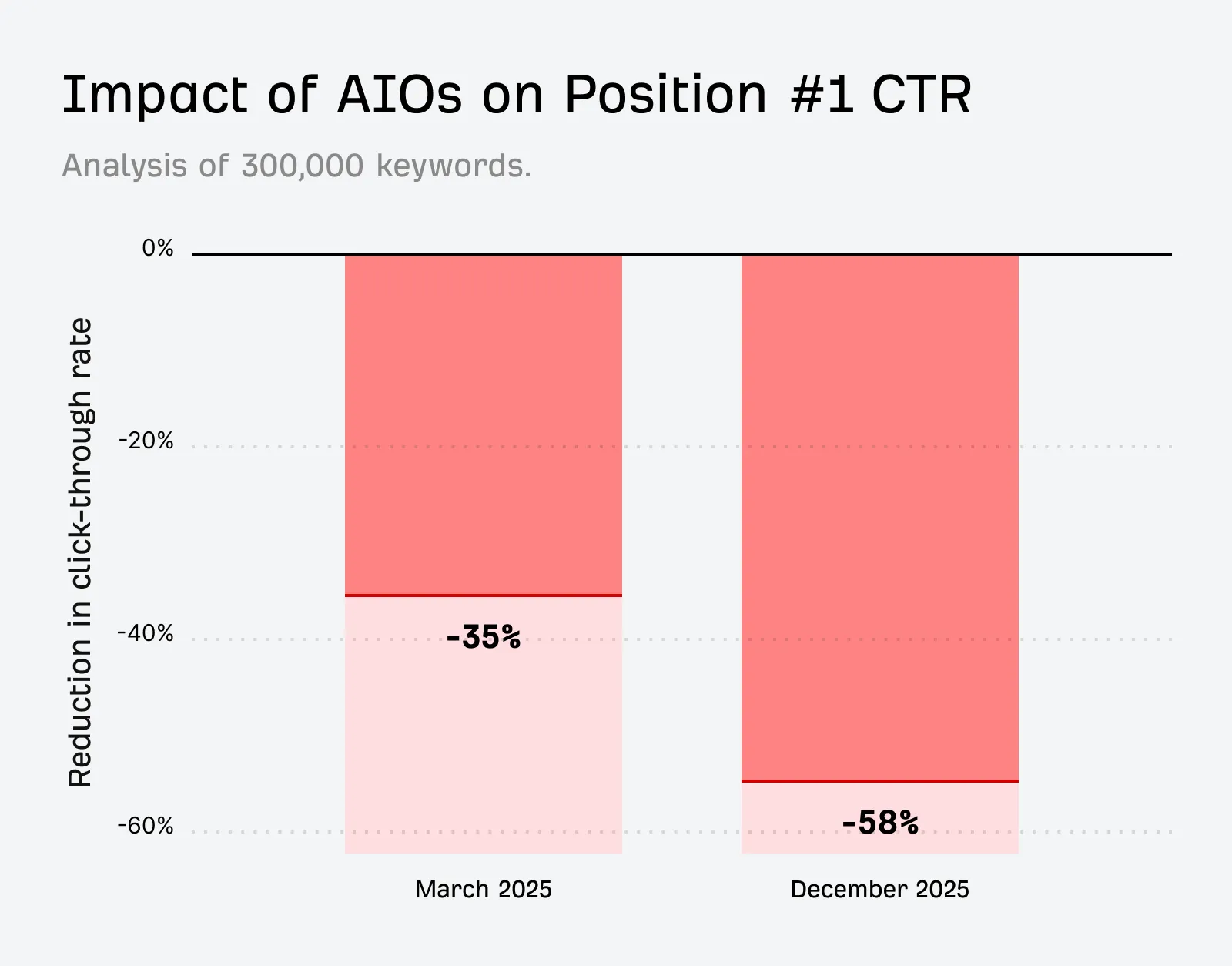
- Clicks are shrinking. Ahrefs measured a 58% lower CTR for the #1 result when an AI Overview appears. 68% of U.S. Google searches ended without a click in early 2026, according to Search Engine Land.
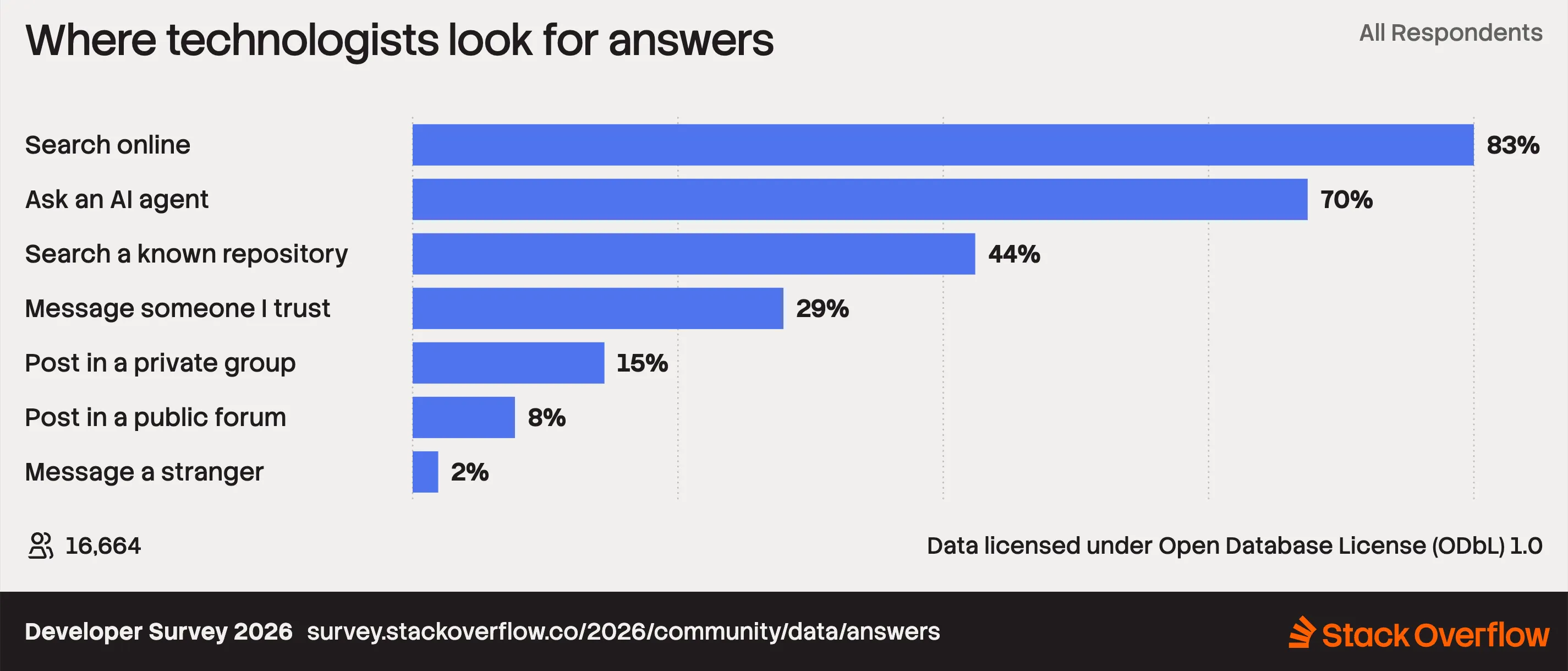
- Developers ask AI first: 70% list “ask an AI agent” among the first places they turn when stuck (Stack Overflow Developer Survey 2026).
- The five-point AEO checklist:
- Lead every section with a direct answer.
- Make every section self-contained.
- Ship machine-readable structure.
- Let AI crawlers in, and serve them real HTML.
- Prove your claims and keep them fresh.
What is AEO?
Answer Engine Optimization (AEO) means structuring your content so that answer engines (Google AI Overviews, ChatGPT, Perplexity, Claude) can find your content, extract it, and cite it.
AEO builds on Search Engine Optimization (SEO) rather than replacing it.
Technical content is where AEO competition is fiercest, because developer questions are precise and informational, which is exactly the kind of question AI answers well.
Why does AEO matter now?
Does ranking #1 still guarantee traffic?
No. When an AI Overview appears, the #1 result gets far fewer clicks. Ahrefs found that AI Overviews correlate with a 58% lower average CTR for the top-ranking page (Dec 2025 vs. Dec 2023, 300,000 keywords), up from 34.5% in the April 2025 version of the study.
Ranking on a Search Engine Result Page (SERP) no longer means your content will get traffic.
Source: Update: AI Overviews Reduce Clicks by 58%
How many searches end without a click?
Most of them. According to Search Engine Land, 68.01% of U.S. Google searches ended without a click in Jan–Apr 2026, up from 60.45% in 2024. AI Overviews are widely seen as a major driver. The searches still happen, but fewer of them reach your site.
Where do developers look for answers first?
Increasingly, an AI agent. In the Stack Overflow Developer Survey 2026, 70% of developers put “ask an AI agent” among the first places they turn when they hit a problem.
Source: Where technologists look for answers
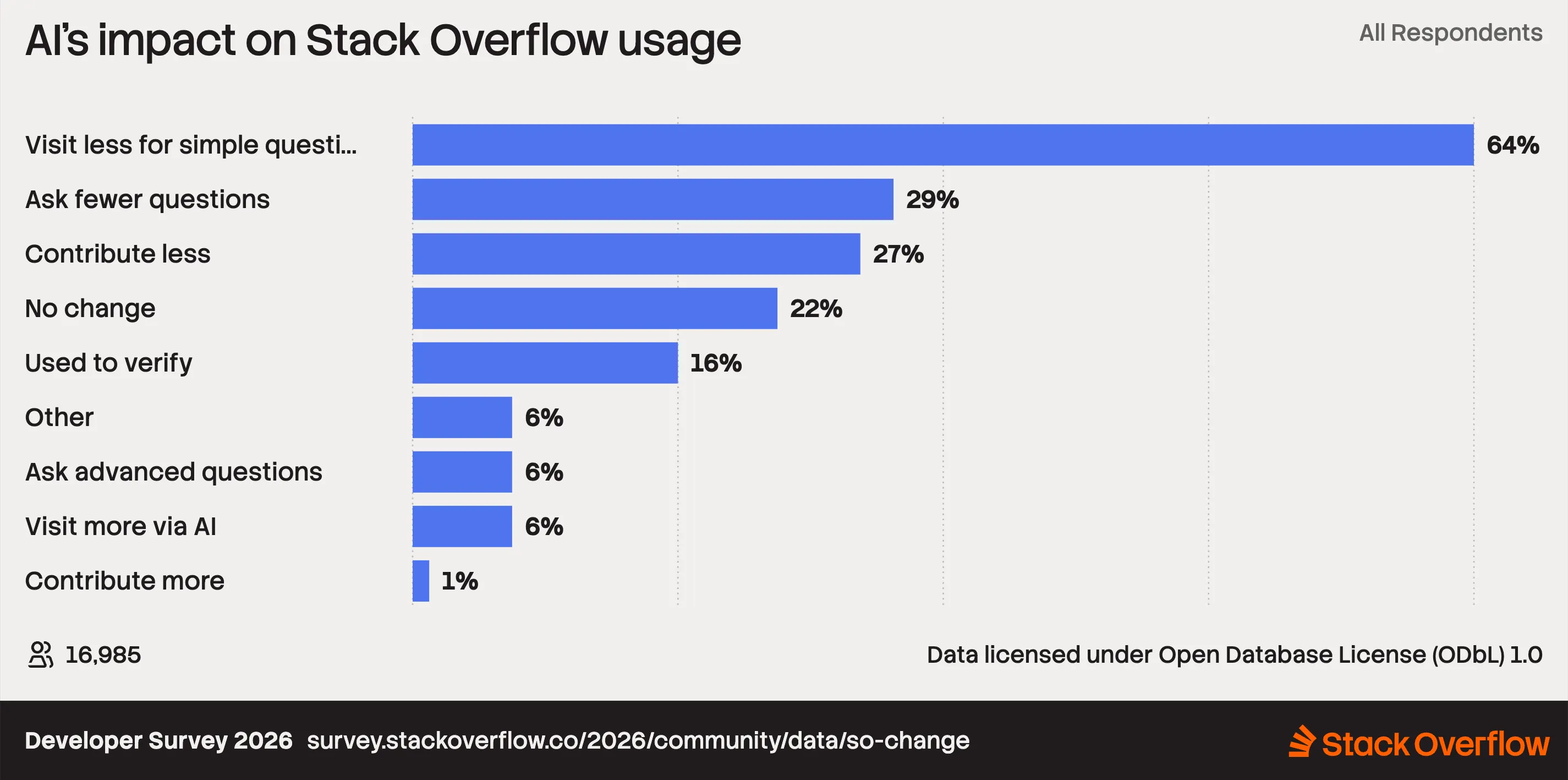
And 64% of developers say they visit Stack Overflow less for simple questions because of AI.
Source: AI’s impact on Stack Overflow Usage
Are AI-referred visitors worth having?
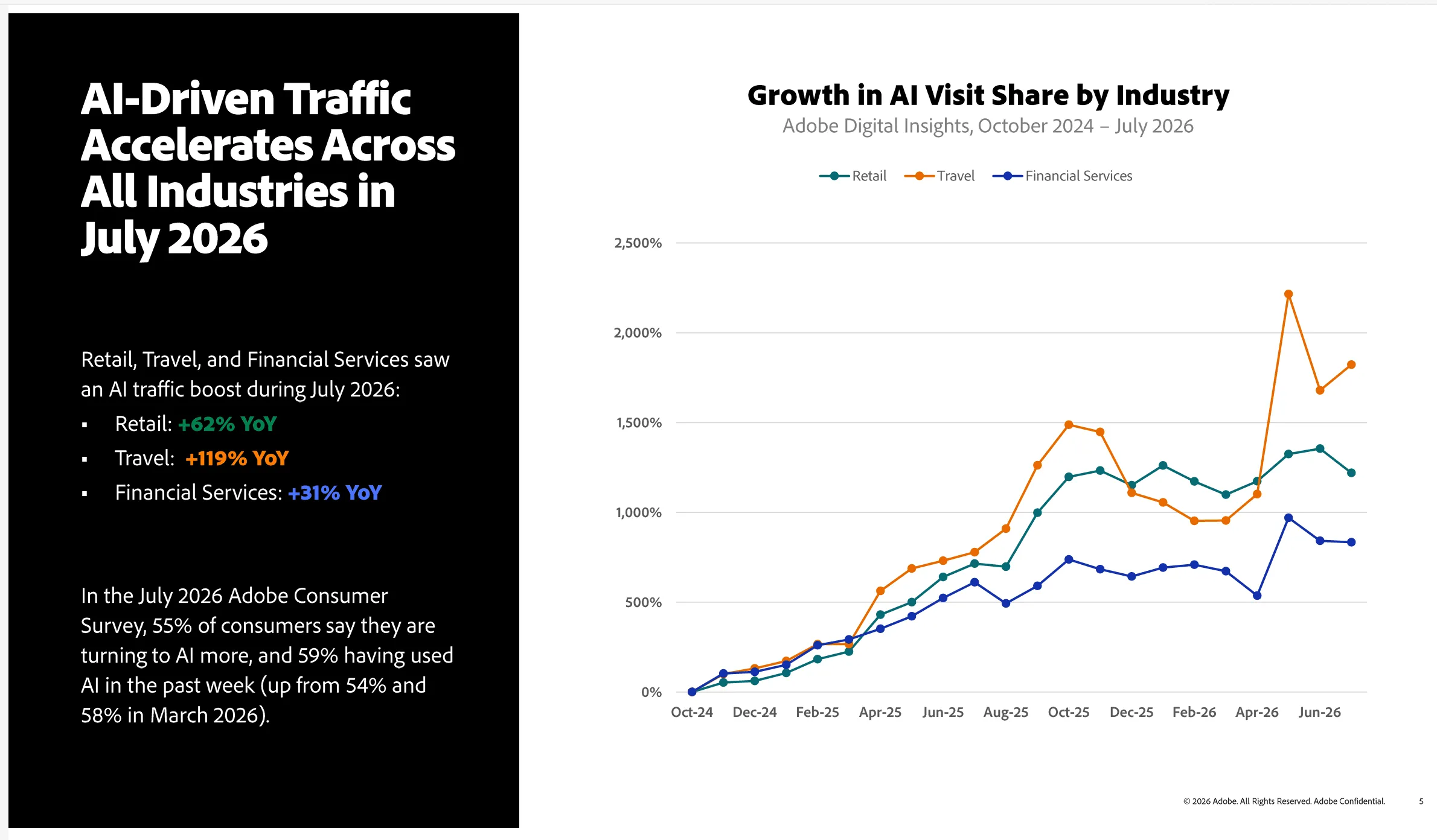
Early data says yes: they arrive fewer but more ready to act. In July 2026, AI-referred visitors to U.S. retail sites converted at a 60% higher rate than non-AI visitors, spent 59% more time on site, and were 34% less likely to bounce, according to Adobe’s AI Traffic Trends Report. This is retail data, not developer data, so treat it as a signal rather than proof. Your own analytics will show whether it holds for your docs.
Source: AI Traffic Trends Report: August 2026
The AEO Checklist for Technical Content
1. Lead every section with a direct answer
Put a complete answer to the heading’s question in the first 40–60 words of each section. Answer engines extract the first clear answer they find under a relevant heading.
Technical writing tends to build toward the point: background first, then setup, then the answer. AI systems extract passages, and a passage that opens with three sentences of context loses to a competitor’s passage that opens with the answer.
- Phrase headings as the questions developers ask. “How do I paginate the GitHub REST API?” beats “Pagination.”
- Write the first sentence under each heading so it stands on its own if quoted.
- Use the definition pattern for concept posts: “X is a Y that does Z.”
Before:
Pagination is an important topic when working with large datasets. There are several approaches, and in this section we’ll explore them…
After:
To paginate the GitHub REST API, pass the
per_pageandpagequery parameters, for exampleGET /repos/{owner}/{repo}/issues?per_page=50&page=2. TheLinkresponse header contains the URL of the next page.
2. Make every section self-contained
AI systems retrieve and cite individual passages, not whole pages. Write each section so it makes sense with no context from earlier sections.
Retrieval pipelines split pages into chunks, embed them, and return the chunks most relevant to a query. A chunk that says “as we configured above” makes no sense once it’s pulled out of the page.
- Keep one idea per H2 or H3. Split any section that answers two questions.
- Replace back-references (“the file from step 2”) with explicit names (“
src/lib/github.ts”). - Restate key context where a section depends on it: framework, version, file path.
- Define acronyms on first use in each major section.
- Make every code block complete and runnable, with imports, a file path, and a language tag:
// src/lib/github.ts — fetch every page of issues from the GitHub REST API (Node.js 18+)
type Issue = { id: number; title: string };

export async function fetchAllIssues(
  owner: string,
  repo: string,
): Promise<Issue[]> {
  const issues: Issue[] = [];
  let nextUrl: string | null =
    `https://api.github.com/repos/${owner}/${repo}/issues?per_page=100`;

  while (nextUrl) {
    const response = await fetch(nextUrl, {
      headers: { Accept: "application/vnd.github+json" },
    });

    if (!response.ok) {
      throw new Error(
        `GitHub API error: ${response.status} ${response.statusText}`,
      );
    }

    issues.push(...((await response.json()) as Issue[]));

    // The Link header holds the next page URL, if one exists
    const linkHeader = response.headers.get("link") ?? "";
    const nextMatch = linkHeader.match(/<([^>]+)>;\s*rel="next"/);
    nextUrl = nextMatch ? nextMatch[1] : null;
  }

  return issues;
}
What’s happening here: the function follows GitHub’s Link header until no rel="next" URL is left, and throws on any non-2xx response. A reader, or an answer engine, can lift this block and run it without reading the rest of the page.
3. Ship machine-readable structure
Semantic HTML, tables, and JSON-LD structured data tell machines what each part of your page is. That makes the content easier to parse, attribute, and trust.
Structured, informational pages are what AI cites most: Adobe found that blogs, guides, FAQs, and support pages are the easiest content for AI to cite, in every industry it studied.
Answer engines read your HTML. A page built from styled <div>s gives them far less to work with than one that uses real headings, lists, tables, and <code> elements.
- Keep a strict heading hierarchy: one H1, then H2 and H3 nested in order. Never skip levels for styling.
- Put comparisons, version matrices, and config options in HTML tables with clear headers, not in images or prose.
- Write descriptive alt text for every chart and screenshot. A filename like
chart-001.pngtells a machine nothing. - Add
TechArticle(orArticle) JSON-LD withauthor,datePublished, anddateModifiedas the baseline for tutorials:
<!-- JSON-LD structured data for a technical tutorial page -->
<script type="application/ld+json">
  {
    "@context": "https://schema.org",
    "@type": "TechArticle",
    "headline": "How to paginate the GitHub REST API in TypeScript",
    "author": {
      "@type": "Person",
      "name": "Author Name",
      "url": "https://example.com/authors/author-name"
    },
    "datePublished": "2026-09-01",
    "dateModified": "2026-10-10",
    "proficiencyLevel": "Beginner",
    "dependencies": "Node.js 18+, TypeScript 5"
  }
</script>- Validate the markup with Google’s Rich Results Test or the Schema Markup Validator.
If you publish from a headless CMS, store structured data as fields (author, updated date, difficulty, dependencies) rather than free text. The frontend can then generate JSON-LD for every page automatically.
4. Let AI crawlers in, and serve them real HTML
If AI crawlers can’t fetch your page, or fetch an empty JavaScript shell, nothing else on this AEO checklist matters.
Fix crawlability first. Many AI crawlers don’t execute JavaScript, so a client-side-rendered docs site looks empty to them.
- Audit
robots.txt. Sites often block AI bots by accident, through a blanket rule or a CDN bot-protection default. Treat retrieval bots, which fetch pages to answer questions and drive citations, separately from training bots, which collect data for future models. This example allows retrieval and opts out of training:
# robots.txt — allow AI retrieval bots (citations), opt out of AI training bots

# Search and answer retrieval: keep these allowed to be cited
User-agent: OAI-SearchBot
Allow: /

User-agent: ChatGPT-User
Allow: /

User-agent: Claude-SearchBot
Allow: /

User-agent: Claude-User
Allow: /

User-agent: PerplexityBot
Allow: /

# Model training: your call. This example opts out.
User-agent: GPTBot
Disallow: /

User-agent: ClaudeBot
Disallow: /

User-agent: Google-Extended
Disallow: /
One caveat: Google-Extended controls whether Gemini models use your content. It does not remove you from Google AI Overviews, which rely on the regular Googlebot crawler.
- Render on the server. Use SSR or static generation (Next.js, Astro, Nuxt) so the full content, code blocks included, is in the initial HTML. Confirm it from the terminal:
# Check that a key sentence appears in the raw HTML, without running JavaScript
curl -s https://yoursite.com/your-post | grep -c "your key sentence"- Keep the sitemap accurate. Set real
<lastmod>dates so crawlers revisit pages you’ve updated. - Check CDN and WAF settings. Cloudflare and similar services can block AI crawlers by default.
- Treat
llms.txtas optional. It’s a proposed convention that gives LLMs a Markdown index of your docs. It’s cheap to add, but no major answer engine has confirmed it affects citations, so finish the steps above first.
5. Prove your claims and keep them fresh
Answer engines favor sources that look accurate, current, and accountable. For technical content, that means versions, dates, tested code, named authors, and links to primary sources.
Developers check AI answers against the source: in the Stack Overflow Developer Survey 2025, more developers distrusted the accuracy of AI tools (46%) than trusted it. Clearly versioned, dated content holds up to that check, and answer engines are built to prefer it.
- State versions explicitly, for example “Tested with Node.js 22 and TypeScript 5.6,” near the top and in any section that depends on them.
- Show a visible “Last updated” date and keep it in sync with
dateModifiedin your schema. - Link primary sources such as official docs, RFCs, changelogs, and original studies, not secondary summaries.
- Use real author bylines that link to author pages showing expertise (GitHub, talks, past work).
- Test every code sample before publishing and again after each major version bump of the tools it covers.
- Schedule refreshes. Tag time-sensitive content (pricing, version-specific APIs, deprecations) and review it quarterly.
- Measure AI visibility. Track referral traffic from
chatgpt.com,perplexity.ai,claude.ai, andgemini.google.comin analytics. Each month, ask the major answer engines your target questions and record whether they cite you.
Need help making your technical content AI-ready?
Need help with your technical content? That’s where Technical Growth Lab (TGL) comes in. We create and optimize technical content for DevTool companies, including:
- Tutorials and how-tos that answer developer questions up front
- Integration guides and comparison pages built to be cited
- Documentation that’s structured for both developers and answer engines
- Video shorts that turn your technical content into quick explainers
- SEO, AEO, and GEO so your content ranks in search and gets cited in AI answers
- Technical growth and optimization for content you’ve already published
Conclusion
AEO doesn’t replace what you know about technical writing. It enforces habits strong docs teams already have: answer the question up front, keep sections focused, structure content for machines, keep pages crawlable, and keep them accurate.
What’s changed is how much it costs to skip those habits. With most searches ending without a click and AI Overviews cutting top-result CTR by more than half, cited content gets the developer’s attention, and uncited content goes unseen.
Run your top pages through this AEO checklist this week and track which ones start getting cited.
Frequently asked questions
What is AEO?
Answer Engine Optimization (AEO) is the practice of structuring content so AI answer engines such as Google AI Overviews, ChatGPT, Perplexity, and Claude can extract it and cite it in their answers.
How is AEO different from SEO?
SEO aims to rank pages in search results. AEO aims to get specific passages cited inside AI-generated answers. AEO depends on SEO basics like crawlability and authority, then adds answer-first writing, self-contained sections, and machine-readable structure.
Is AEO the same as GEO?
Mostly, yes. Generative Engine Optimization (GEO) and AEO describe overlapping practices. GEO usually refers to LLM chat interfaces, and AEO covers any engine that returns direct answers, including featured snippets and AI Overviews.
Does `llms.txt` help with AEO?
Not in any proven way yet. llms.txt is a proposed standard, and no major answer engine has confirmed it uses the file for citations. Prioritize server-rendered HTML and an accurate robots.txt first.
How do I measure AEO results?
Track referral traffic from AI platforms such as chatgpt.com, perplexity.ai, claude.ai, and gemini.google.com in your analytics. Then test your target questions in each major answer engine every month and record whether you're cited. Search Console counts AI Overview appearances inside normal web search data, so it can't isolate them.
Next step
Tell us what you are trying to grow.
A 30-minute call: we look at what you have published, where you are and are not being cited today, and what a first engagement would cover. You leave with a scope and a price, whether or not you work with us.